
When modeling thin-walled structures (like pressure vessels) with shell elements, you may need to apply different temperatures on the inner and outer surfaces. This creates a thermal gradient and bending stresses through the thickness. If you only apply one temperature value, a thermal gradient will not be developed.
ANSYS does provide a Beta feature called Thermal Variation Through Thickness (related to SHELL131 behavior), but it can be inconsistent and difficult to work with. In my experience, a cleaner and more reliable approach is to import two separate temperature states into the structural model and apply one to the top surface of the shell and the other to the bottom.
Thin-walled pressure vessel example:
Let us consider a simple example.
Inner wall (ID): 20 °C
Outer wall (OD): 100 °C
Set up a Thermal Analysis:
- At Time Step 1, apply 20 °C to the shell (inner wall condition).
- At Time Step 2, apply 100 °C to the shell (outer wall condition)
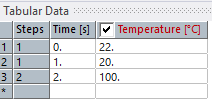
- Solve to obtain the two temperature states within the shell
Set up a Structural Analysis:
- Drag and drop the thermal solution into a Static Structural system to create the data link.
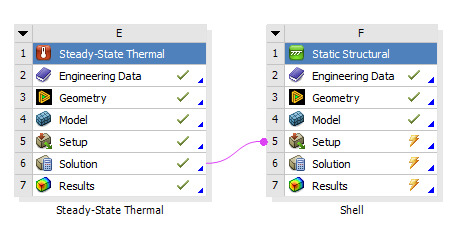
- In the structural environment, insert an Imported Temperature object.
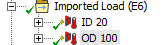
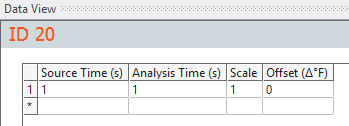
Set Source Time = 1.
Set Analysis Time =1.
Scope the shell body.
Set Shell Face = Bottom (represents the inner surface).
- Duplicate that Imported Temperature object.
Set Source Time = 2 (or End Time)
Set Analysis Time = 1.
Set Shell Face = Top (represents the outer surface).
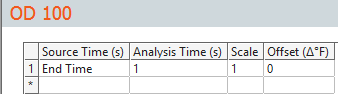
Make sure that the Analysis Time (in this case 1) is the same for both the temperature imports – This tells Ansys to import the top and bottom temperature at the same time (hence generating a thermal gradient).
Once these two temperature fields are applied, the shell element carries a temperature difference through its thickness. Once solved, ANSYS automatically generates the structure response based on the difference between the top and bottom temperatures.